> ## Documentation Index
> Fetch the complete documentation index at: https://docs-docflow.textin.ai/llms.txt
> Use this file to discover all available pages before exploring further.
# Multi-Image Cropping
> Intelligently recognize and crop documents containing multiple independent images on one page, supporting scenarios like expense receipt pasting
## Feature Overview
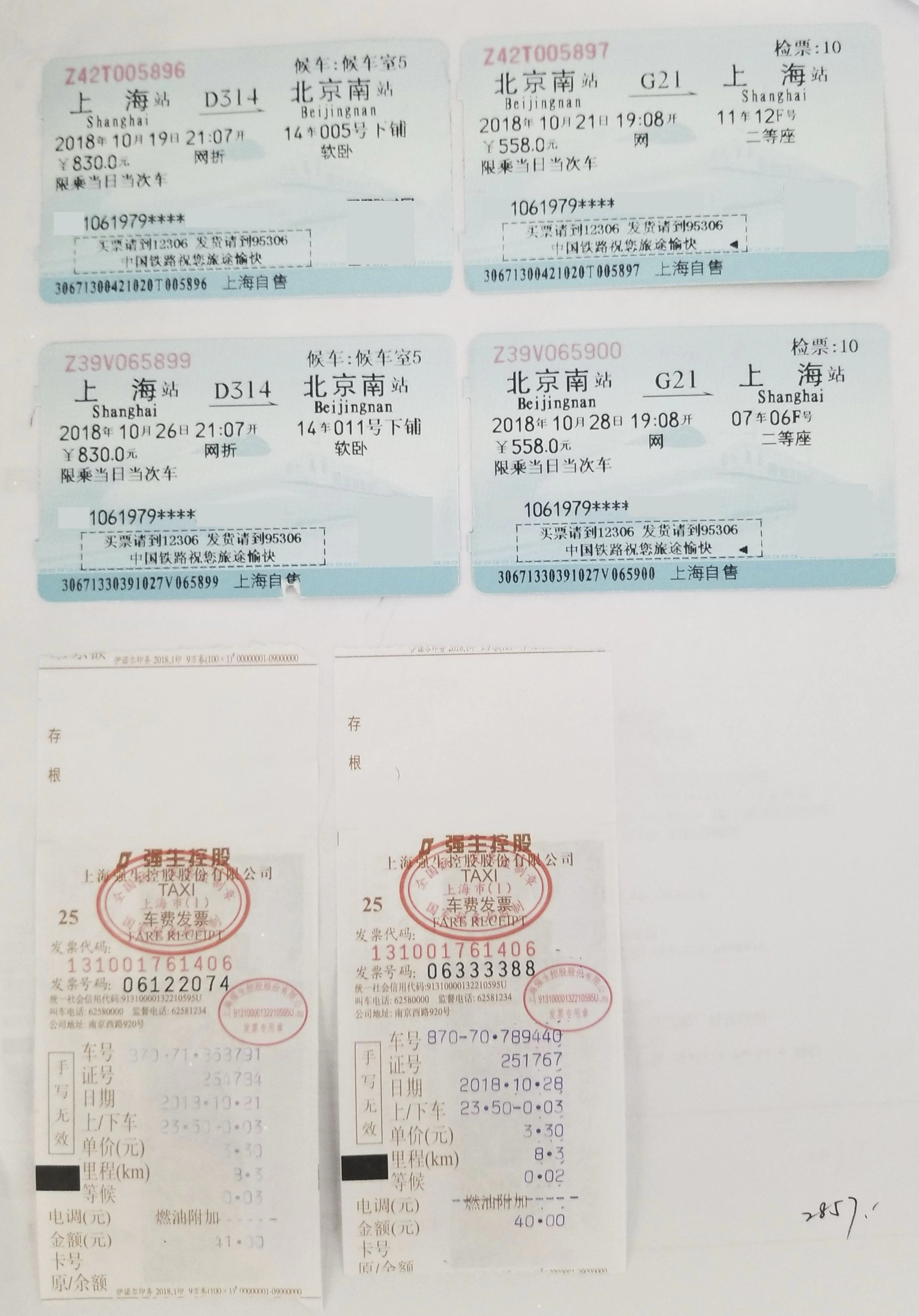
The multi-image cropping function can automatically recognize multiple independent images or tickets contained in one page of a document and separately crop them into independent sub-documents. This is particularly useful for scenarios such as processing reimbursement attachments or scans containing multiple receipts.
## Use Cases
### 1. Expense Receipt Pasting Scenario
An A4 paper with multiple tickets laid flat:
* Train tickets
* Flight itineraries
* Multiple taxi invoices
* Restaurant invoices
Through the multi-image cropping function, each ticket can be separately recognized and cropped, facilitating subsequent classification and amount extraction.
 ## API Parameter Configuration
### Enable Multi-Image Cropping Function
Set `crop_flag=true` in the upload interface to enable the multi-image cropping function:
```bash curl icon=terminal wrap theme={null}
curl -X POST \
-H "x-ti-app-id: " \
-H "x-ti-secret-code: " \
-F "file=@/path/to/multi-image-document.pdf" \
"https://docflow.textin.ai/api/app-api/sip/platform/v2/file/upload?workspace_id=&crop_flag=true"
```
### Parameter Description
| Parameter Name | Type | Default Value | Description |
| -------------- | ------- | ------------- | ----------------------------------------------- |
| `crop_flag` | boolean | false | Whether to enable multi-image cropping function |
## Example Code
```python Python expandable icon=python theme={null}
import requests
import json
def upload_with_crop(file_path, workspace_id, app_id, secret_code):
"""
Upload file and enable multi-image cropping function
"""
url = "https://docflow.textin.ai/api/app-api/sip/platform/v2/file/upload"
headers = {
"x-ti-app-id": app_id,
"x-ti-secret-code": secret_code
}
params = {
"workspace_id": workspace_id,
"crop_flag": "true" # Enable multi-image cropping function
}
with open(file_path, 'rb') as file:
files = {'file': file}
response = requests.post(url, headers=headers, params=params, files=files)
return response.json()
def fetch_crop_results(workspace_id, batch_number, app_id, secret_code):
"""
Query multi-image cropping results
"""
url = "https://docflow.textin.ai/api/app-api/sip/platform/v2/file/fetch"
headers = {
"x-ti-app-id": app_id,
"x-ti-secret-code": secret_code
}
params = {
"workspace_id": workspace_id,
"batch_number": batch_number
}
response = requests.get(url, headers=headers, params=params)
return response.json()
def parse_crop_coordinates(from_parent_position_list):
"""
Parse cropping coordinate information
Coordinate format: [x1, y1, x2, y2, x3, y3, x4, y4]
Represents the four vertex coordinates of a rectangle
"""
if len(from_parent_position_list) != 8:
return None
coordinates = {
"top_left": (from_parent_position_list[0], from_parent_position_list[1]),
"top_right": (from_parent_position_list[2], from_parent_position_list[3]),
"bottom_right": (from_parent_position_list[4], from_parent_position_list[5]),
"bottom_left": (from_parent_position_list[6], from_parent_position_list[7])
}
# Calculate bounding box
x_coords = [coord[0] for coord in coordinates.values()]
y_coords = [coord[1] for coord in coordinates.values()]
bbox = {
"x_min": min(x_coords),
"y_min": min(y_coords),
"x_max": max(x_coords),
"y_max": max(y_coords),
"width": max(x_coords) - min(x_coords),
"height": max(y_coords) - min(y_coords)
}
return {"coordinates": coordinates, "bbox": bbox}
# Usage example
if __name__ == "__main__":
# Configuration information
WORKSPACE_ID = "your-workspace-id"
APP_ID = "your-app-id"
SECRET_CODE = "your-secret-code"
FILE_PATH = "/path/to/multi-image-document.pdf"
# Upload file and enable multi-image cropping
upload_result = upload_with_crop(FILE_PATH, WORKSPACE_ID, APP_ID, SECRET_CODE)
print("Upload result:", json.dumps(upload_result, indent=2, ensure_ascii=False))
# Get batch number
batch_number = upload_result.get("result", {}).get("batch_number")
if batch_number:
# Query multi-image cropping results
fetch_result = fetch_crop_results(WORKSPACE_ID, batch_number, APP_ID, SECRET_CODE)
print("Multi-image cropping result:", json.dumps(fetch_result, indent=2, ensure_ascii=False))
# Parse coordinate information
files = fetch_result.get("result", {}).get("files", [])
for file in files:
child_files = file.get("child_files", [])
for child in child_files:
if child.get("task_type") == 3: # Sub-file generated by multi-image cropping
position_list = child.get("from_parent_position_list")
if position_list:
coord_info = parse_crop_coordinates(position_list)
print(f"Coordinate information for sub-file {child.get('name')}:", coord_info)
```
## Return Result Description
### Multi-Image Cropping Result Structure
After enabling the multi-image cropping function, the result returned by the `file/fetch` interface will include the `child_files` field, which describes the information of sub-documents after cropping:
```json expandable theme={null}
{
"code": 200,
"result": {
"files": [
{
"id": "parent-file-001",
"name": "multi-image-document.pdf",
"format": "pdf",
"child_files": [
{
"id": "child-001",
"task_id": "task-001",
"task_type": 3, // 3 indicates sub-file generated by multi-image cropping
"name": "multi-image-document.pdf#1",
"format": "pdf",
"category": "invoice",
"from_parent_position_list": [12, 30, 420, 30, 420, 320, 12, 320],
"crop_info":{"page":0,"imageAngle":"0"}
"status": "success"
},
{
"id": "child-002",
"task_id": "task-002",
"task_type": 3,
"name": "multi-image-document.pdf#2",
"format": "pdf",
"category": "receipt",
"from_parent_position_list": [450, 30, 800, 30, 800, 200, 450, 200],
"crop_info":{"page":0,"imageAngle":"0"}
"status": "success"
}
]
}
]
}
}
```
### Key Field Description
| Field Name | Type | Description |
| ----------------------------------------- | ------- | ---------------------------------------------------------------------------------------------------------------- |
| `child_files` | array | List of sub-files after cropping |
| `child_files[].id` | string | Unique identifier of sub-file |
| `child_files[].task_type` | integer | Task type, 3 indicates generated by multi-image cropping |
| `child_files[].category` | string | Document classification result |
| `child_files[].from_parent_position_list` | array | Coordinates of cropping area in original image, refer to [Coordinate System Description](../03-parse/coordinate) |
| `child_files[].crop_info` | object | Detailed information of multi-image cropping, including page index and angle information |
## API Parameter Configuration
### Enable Multi-Image Cropping Function
Set `crop_flag=true` in the upload interface to enable the multi-image cropping function:
```bash curl icon=terminal wrap theme={null}
curl -X POST \
-H "x-ti-app-id: " \
-H "x-ti-secret-code: " \
-F "file=@/path/to/multi-image-document.pdf" \
"https://docflow.textin.ai/api/app-api/sip/platform/v2/file/upload?workspace_id=&crop_flag=true"
```
### Parameter Description
| Parameter Name | Type | Default Value | Description |
| -------------- | ------- | ------------- | ----------------------------------------------- |
| `crop_flag` | boolean | false | Whether to enable multi-image cropping function |
## Example Code
```python Python expandable icon=python theme={null}
import requests
import json
def upload_with_crop(file_path, workspace_id, app_id, secret_code):
"""
Upload file and enable multi-image cropping function
"""
url = "https://docflow.textin.ai/api/app-api/sip/platform/v2/file/upload"
headers = {
"x-ti-app-id": app_id,
"x-ti-secret-code": secret_code
}
params = {
"workspace_id": workspace_id,
"crop_flag": "true" # Enable multi-image cropping function
}
with open(file_path, 'rb') as file:
files = {'file': file}
response = requests.post(url, headers=headers, params=params, files=files)
return response.json()
def fetch_crop_results(workspace_id, batch_number, app_id, secret_code):
"""
Query multi-image cropping results
"""
url = "https://docflow.textin.ai/api/app-api/sip/platform/v2/file/fetch"
headers = {
"x-ti-app-id": app_id,
"x-ti-secret-code": secret_code
}
params = {
"workspace_id": workspace_id,
"batch_number": batch_number
}
response = requests.get(url, headers=headers, params=params)
return response.json()
def parse_crop_coordinates(from_parent_position_list):
"""
Parse cropping coordinate information
Coordinate format: [x1, y1, x2, y2, x3, y3, x4, y4]
Represents the four vertex coordinates of a rectangle
"""
if len(from_parent_position_list) != 8:
return None
coordinates = {
"top_left": (from_parent_position_list[0], from_parent_position_list[1]),
"top_right": (from_parent_position_list[2], from_parent_position_list[3]),
"bottom_right": (from_parent_position_list[4], from_parent_position_list[5]),
"bottom_left": (from_parent_position_list[6], from_parent_position_list[7])
}
# Calculate bounding box
x_coords = [coord[0] for coord in coordinates.values()]
y_coords = [coord[1] for coord in coordinates.values()]
bbox = {
"x_min": min(x_coords),
"y_min": min(y_coords),
"x_max": max(x_coords),
"y_max": max(y_coords),
"width": max(x_coords) - min(x_coords),
"height": max(y_coords) - min(y_coords)
}
return {"coordinates": coordinates, "bbox": bbox}
# Usage example
if __name__ == "__main__":
# Configuration information
WORKSPACE_ID = "your-workspace-id"
APP_ID = "your-app-id"
SECRET_CODE = "your-secret-code"
FILE_PATH = "/path/to/multi-image-document.pdf"
# Upload file and enable multi-image cropping
upload_result = upload_with_crop(FILE_PATH, WORKSPACE_ID, APP_ID, SECRET_CODE)
print("Upload result:", json.dumps(upload_result, indent=2, ensure_ascii=False))
# Get batch number
batch_number = upload_result.get("result", {}).get("batch_number")
if batch_number:
# Query multi-image cropping results
fetch_result = fetch_crop_results(WORKSPACE_ID, batch_number, APP_ID, SECRET_CODE)
print("Multi-image cropping result:", json.dumps(fetch_result, indent=2, ensure_ascii=False))
# Parse coordinate information
files = fetch_result.get("result", {}).get("files", [])
for file in files:
child_files = file.get("child_files", [])
for child in child_files:
if child.get("task_type") == 3: # Sub-file generated by multi-image cropping
position_list = child.get("from_parent_position_list")
if position_list:
coord_info = parse_crop_coordinates(position_list)
print(f"Coordinate information for sub-file {child.get('name')}:", coord_info)
```
## Return Result Description
### Multi-Image Cropping Result Structure
After enabling the multi-image cropping function, the result returned by the `file/fetch` interface will include the `child_files` field, which describes the information of sub-documents after cropping:
```json expandable theme={null}
{
"code": 200,
"result": {
"files": [
{
"id": "parent-file-001",
"name": "multi-image-document.pdf",
"format": "pdf",
"child_files": [
{
"id": "child-001",
"task_id": "task-001",
"task_type": 3, // 3 indicates sub-file generated by multi-image cropping
"name": "multi-image-document.pdf#1",
"format": "pdf",
"category": "invoice",
"from_parent_position_list": [12, 30, 420, 30, 420, 320, 12, 320],
"crop_info":{"page":0,"imageAngle":"0"}
"status": "success"
},
{
"id": "child-002",
"task_id": "task-002",
"task_type": 3,
"name": "multi-image-document.pdf#2",
"format": "pdf",
"category": "receipt",
"from_parent_position_list": [450, 30, 800, 30, 800, 200, 450, 200],
"crop_info":{"page":0,"imageAngle":"0"}
"status": "success"
}
]
}
]
}
}
```
### Key Field Description
| Field Name | Type | Description |
| ----------------------------------------- | ------- | ---------------------------------------------------------------------------------------------------------------- |
| `child_files` | array | List of sub-files after cropping |
| `child_files[].id` | string | Unique identifier of sub-file |
| `child_files[].task_type` | integer | Task type, 3 indicates generated by multi-image cropping |
| `child_files[].category` | string | Document classification result |
| `child_files[].from_parent_position_list` | array | Coordinates of cropping area in original image, refer to [Coordinate System Description](../03-parse/coordinate) |
| `child_files[].crop_info` | object | Detailed information of multi-image cropping, including page index and angle information |